ArchiCAD to Blender
ArchiCAD can save several 3D formats Blender opens, but they keep different things. For rendering, FBX is the one to try first: one file with geometry, surfaces and textures. IFC keeps the BIM data. OBJ looks simple but loses its materials on the way.
Which format to use
- FBX: for rendering. Geometry, surfaces and textures in one file.
- IFC: if you need element types and properties in Blender, opened with the Bonsai extension.
- Speckle: if the design keeps changing and you'll send updates. Windows only on the ArchiCAD side.
- OBJ and 3DS: fallbacks, with the traps below.
1. FBX
- Open the 3D window and show only what you want to export. Saving 3D formats works from the 3D window.
- Choose File > Save as and pick FBX.
- Set Create FBX meshes by to Surface. You get one mesh per ArchiCAD surface, which makes replacing materials in Blender quick.
- Tick Embed textures in FBX if your surfaces use textures.
- Pick Export colors and transparency only for the most compatible file. Export all surface settings carries more of ArchiCAD's surface data, but you'll rebuild materials in Blender either way.
- In Blender, use File > Import > FBX.
Graphisoft's help documents FBX export in ArchiCAD 27 to 30. Forum posts say it was missing in version 26. Blender 5.0 made a new, much faster FBX importer the default. Blender 4.5 has it as FBX (.fbx) (experimental) next to the older Python importer, and 4.2 to 4.4 have only the Python one.
2. IFC with Bonsai
Save as IFC from ArchiCAD, then open it in Blender with Bonsai (formerly BlenderBIM), a free extension. Install it from Edit > Preferences > Get Extensions. Once it's enabled, the File menu has Open IFC Project, according to Bonsai's install guide. We haven't run it.
Its current release comes in two builds: one for Blender 5.1 and newer, one for 4.2 to 5.0, for Windows, Linux and Apple Silicon Macs. Intel Macs get the older 0.8 releases.
ArchiCAD's IFC export has a Define IFC model position by option, and by default the Survey Point sets where the model sits, so a model tied to real-world coordinates can land far from Blender's origin. See the Revit guide for that trap and its fix.
3. OBJ and 3DS
- OBJ: ArchiCAD writes the geometry plus a .mat file for the surfaces. Blender's OBJ importer reads materials from a matching .mtl file, so the materials will probably be missing. We haven't tested this. In the export dialog, set the unit so that 1 drawing unit is 1 m (1000 mm). Graphisoft says that gives a 1:1 model.
- 3DS: Blender needs the free Autodesk 3D Studio (.3ds) extension to read it. The format limits names to 10 characters and objects to 65,536 polygons, so ArchiCAD splits big elements.
4. Speckle
Speckle sends models from ArchiCAD 27 to 30 (Windows only) to a Blender connector (Blender 4.2 to 5.1, Windows and macOS). It publishes elements visible in the 3D view with their properties. Image textures don't transfer, and its Blender connector skips textures, cameras and lights. You need a Speckle account.
5. Clean up in Blender
- Scale: measure a door with the Measure tool. It should be about 2.1 m. If not, check the export's drawing unit, or the Scale option on import.
- Curves: curved walls and round columns arrive as flat facets. If the facets show in a close-up, increase the curve resolution in ArchiCAD before exporting. We found no export-time setting for it in Graphisoft's help.
- Materials: with meshes by surface, each ArchiCAD surface should arrive as its own mesh and material. Replace them with your own, for example concrete or wood.
- Glass: imported glazing rarely lets sunlight through. See window glass.
- More on origin, object count and UVs in the Revit guide's cleanup list.
What we checked and what we didn't
This page is based on Graphisoft's help for ArchiCAD 27 to 30, Speckle's docs, the Blender manual and extension listings, checked on 2026-11-03. We didn't run ArchiCAD, so none of these exports were tested on a real ArchiCAD model.
Or render it in one click
If the client wants a lit image before the materials are rebuilt, Partilock, the Blender add-on we build (macOS), sends the camera view to an AI image model and returns the image in about a minute. A real 2K render, unretouched:
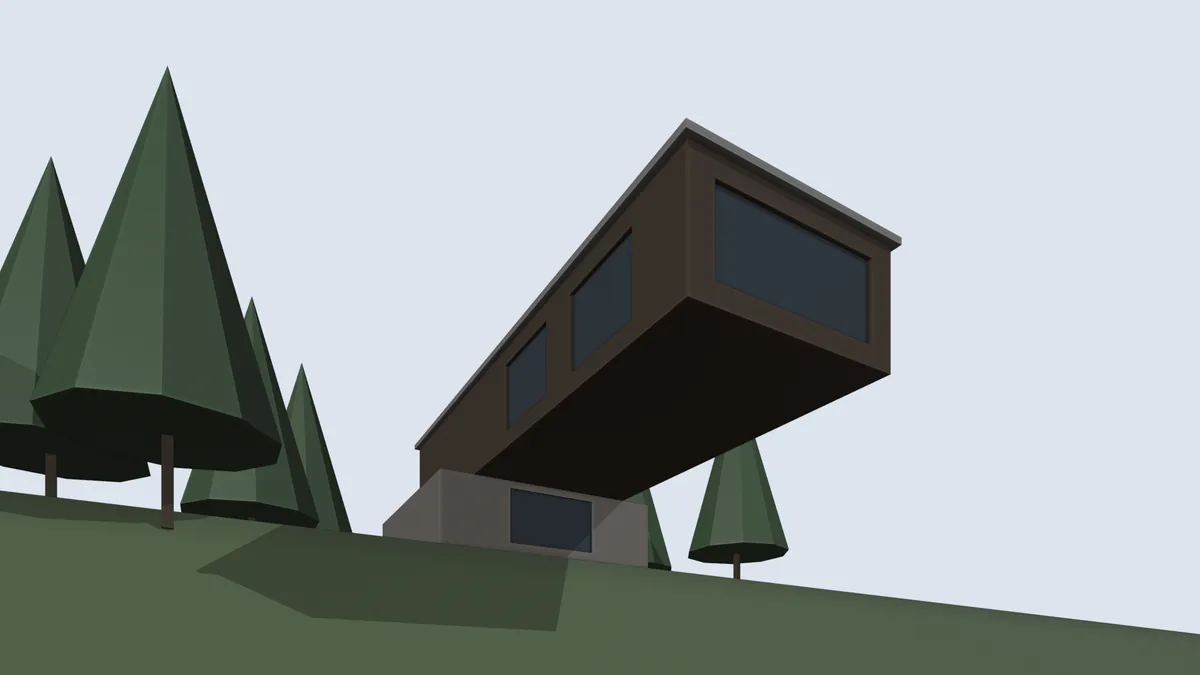
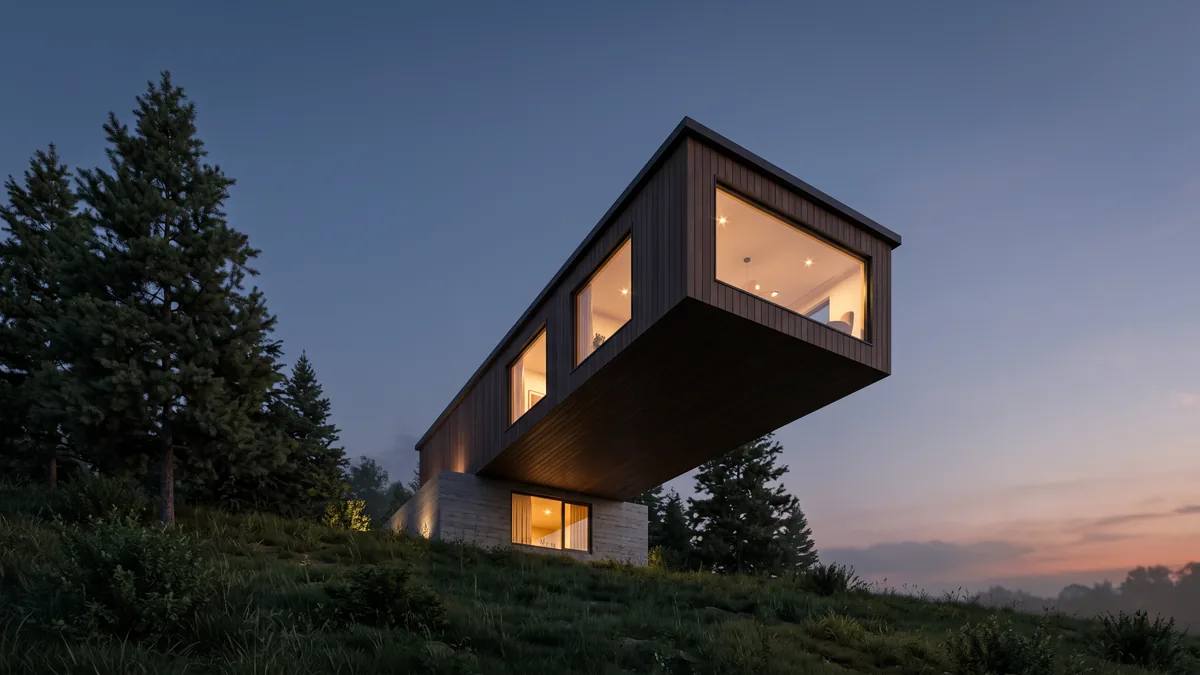
The model was a dark brown box on a beige box with cone trees on a green slope. The render gave the upper box vertical timber cladding, the lower box pale stone, lit the rooms with downlights, added curtains, real pines, grass and a sunset. None of those materials are set in the model.
It's an image, not geometry, and it can add details that aren't in the model, so check it before a client sees it. 2 free renders to try (1K, watermarked), then 2K from $9 for 18. Install guide, pricing.
Next up, Revit to Blender, SketchUp to Blender, or AutoCAD to Blender.